Top 4 FREE Open-Source PDF Tools for Windows That Beat Adobe Acrobat! ๐Ÿ†“๐Ÿ–ฅ๏ธ๐Ÿ“„

4 Free Open Source Alternatives to Adobeโ€‚Acrobat for Windows

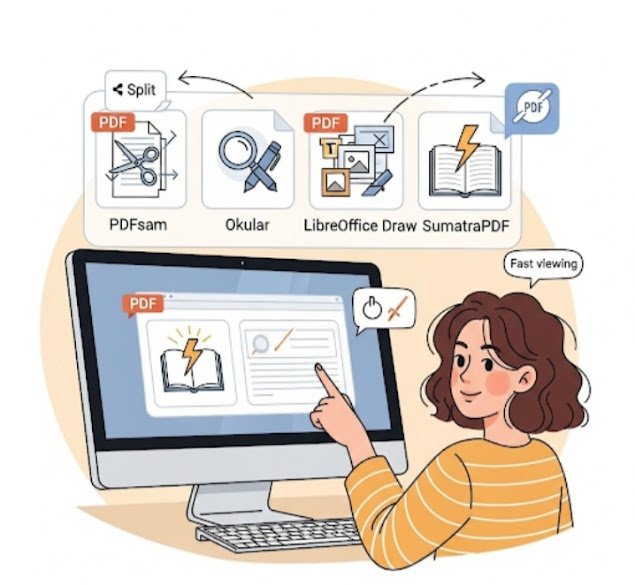
Tired of paying for Adobe Acrobat just to view or edit PDFs? ๐Ÿ˜ฉ You donโ€™t have to! There are powerful, free, open-source tools that let you split, merge, edit, annotate, and view PDFs โ€” all without a subscription ๐Ÿ’ธ. In this 2025 guide ๐ŸŽฏ, we share the top 4 open-source Adobe Acrobat alternatives for Windows that are completely free and beginner-friendly. Whether you want to manage documents ๐Ÿ“‘, annotate notes โœ๏ธ, edit content โœ๏ธ, or simply open files lightning fast โšก โ€” these tools have got you covered! 

Here are 4 of the best free and open-source alternatives to Adobe Acrobat for Windows

1. PDFsam Basic โ€“ Best for Splitting & Merging PDFs โœ‚๏ธ๐Ÿ“Ž๐Ÿงฉ

Why Choose PDFsam Basic?

If you often need to split, merge, rotate, or extract pages from PDFs, this tool is a lifesaver. It’s simple, effective, and beginner-friendly.

Key Features:

  • Split PDFs into single pages โž—
  • Merge multiple PDFs into one โž•
  • Rotate and rearrange pages ๐Ÿ”„
  • Extract specific pages from a document ๐Ÿงพ

Best For: Users who want basic PDF editing functions without a cluttered interface.

Download: pdfsam.org

2. Okular โ€“ Best for Reading & Annotating PDFs ๐Ÿ“๐Ÿ”๐Ÿ“š

Why Choose Okular?

Developed under KDE, Okular is more than just a PDF readerโ€”it supports annotations and multiple file types like eBooks and images.

Key Features:

  • Highlight text, add comments, underline โœ๏ธ
  • Supports various document formats ๐Ÿ“„๐Ÿ“˜
  • Customizable viewing options โš™๏ธ
  • Cross-platform: Windows, Linux & macOS ๐ŸŒ

Best For: Students, researchers, and professionals needing powerful annotation tools.

Download: okular.kde.org

3. LibreOffice Draw โ€“ Best for Editing PDFs โœ๏ธ๐Ÿ–ผ๏ธ๐Ÿ› ๏ธ

Why Choose LibreOffice Draw?

Part of the LibreOffice suite, Draw lets you actually edit text and images in PDF filesโ€”and even create new PDFs from scratch!

Key Features:

  • Modify existing text and images โœ‚๏ธ๐Ÿ–‹๏ธ
  • Create new PDFs with graphics and diagrams ๐Ÿ–Œ๏ธ
  • Export to various formats ๐Ÿ”„
  • Totally free and open-source โœ…

Best For: Anyone who wants to truly edit PDF content without the Adobe price tag.

Download: libreoffice.org

4. SumatraPDF โ€“ Best Lightweight PDF Reader โšก๐Ÿ“„๐Ÿ’จ

Why Choose SumatraPDF?

Itโ€™s ultra-lightweight, fast, and doesn’t bog down your systemโ€”perfect for older or low-spec PCs.

Key Features:

  • Super-fast PDF viewing โšก
  • Supports eBooks (ePub, MOBI) and comics (CBZ, CBR) ๐Ÿ“š
  • Minimalist, clutter-free interface ๐Ÿง˜โ€โ™‚๏ธ
  • Portable version availableโ€”no installation needed ๐Ÿ’พ

Best For: Users who want a simple, no-frills PDF viewer.

Download: Sumatra PDF 3.5

Final Thoughts ๐Ÿ’ฌ

While Adobe Acrobat is powerful, you donโ€™t need to pay a subscription to handle your PDF needs. Whether you’re editing, annotating, combining, or just viewing PDFsโ€”thereโ€™s a free and open-source tool perfect for you.

Which should you choose?

  • Editing: LibreOffice Draw โœ๏ธ
  • Annotations: Okular ๐Ÿ“
  • Splitting & Merging: PDFsam Basic โœ‚๏ธ
  • Fast Viewing: SumatraPDF โšก

Try them out and see which one fits your workflow best!

Was this list helpful? Share your favorite open-source PDF tool with us! ๐Ÿ’กโค๏ธ

FAQS

๐Ÿ”น Can these tools replace Adobe Acrobat completely? ๐Ÿค”

For most everyday PDF tasks โ€” yes ๐Ÿ‘! You can view, annotate, split/merge files, and even do basic editing. However, very advanced features like OCR or form-filling may still be more powerful in paid software. 

๐Ÿ”น Is open-source software safe to use? ๐Ÿ”’

Yes! Open-source tools are made by communities and their code is publicly visible โ€” meaning they are generally transparent, secure, and regularly updated ๐Ÿ› ๏ธ. Always download from the official project website to avoid unsafe versions.

๐Ÿ”นWhich tool is best for heavy PDF editing? โœ๏ธ

LibreOffice Draw is one of the best open-source options for editing existing PDFs โ€” letting you modify text and images without a cost. 

๐Ÿ”น Can these tools run on Windows? ๐Ÿ’ป

Absolutely! All 4 recommended tools work smoothly on Windows computers, and most also support Linux or macOS versions. 

๐Ÿ”นWhich tool is best for simply reading PDFs fast? ๐Ÿ“–

If speed and simplicity matter most, SumatraPDF is one of the fastest and lightest PDF viewers available ๐Ÿ“„โšก. 

๐Ÿ”น Do these tools cost anything? ๐Ÿ’ฐ

No! All four tools listed are 100% free and open-source, meaning you wonโ€™t pay subscription fees like you do for Adobe Acrobat. 

Share your love

Newsletter Updates

Enter your email address below and subscribe to our newsletter

Leave a Reply

Your email address will not be published. Required fields are marked *