Top 4 FREE Open-Source PDF Tools for Windows That Beat Adobe Acrobat!

4 Free Open Source Alternatives to Adobe Acrobat for Windows

Tired of paying for Adobe Acrobat just to view or edit PDFs? 😩 You don’t have to! There are powerful, free, open-source tools that let you split, merge, edit, annotate, and view PDFs — all without a subscription 💸. In this 2025 guide 🎯, we share the top 4 open-source Adobe Acrobat alternatives for Windows that are completely free and beginner-friendly. Whether you want to manage documents 📑, annotate notes ✏️, edit content ✍️, or simply open files lightning fast ⚡ — these tools have got you covered! 

Here are 4 of the best free and open-source alternatives to Adobe Acrobat for Windows

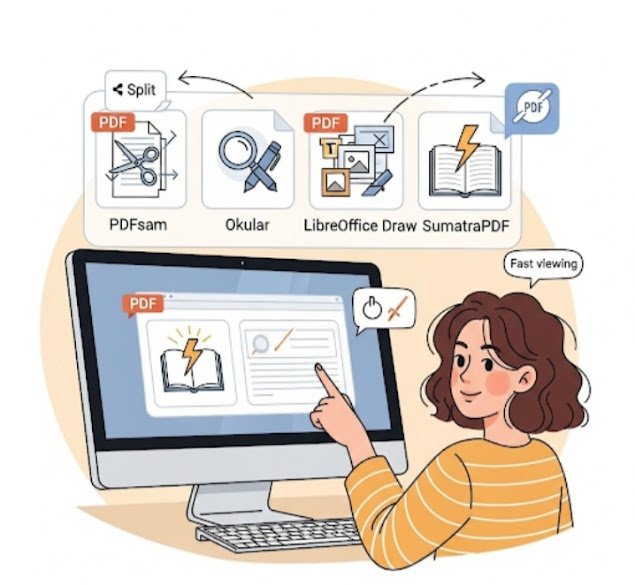
1. PDFsam BasicBest for Splitting & Merging PDFs ✂️📎🧩

Why Choose PDFsam Basic?

If you often need to split, merge, rotate, or extract pages from PDFs, this tool is a lifesaver. It’s simple, effective, and beginner-friendly.

Key Features:

  • Split PDFs into single pages ➗
  • Merge multiple PDFs into one ➕
  • Rotate and rearrange pages 🔄
  • Extract specific pages from a document 🧾

Best For: Users who want basic PDF editing functions without a cluttered interface.

Download: pdfsam.org

2. OkularBest for Reading & Annotating PDFs 📝🔍📚

Why Choose Okular?

Developed under KDE, Okular is more than just a PDF reader—it supports annotations and multiple file types like eBooks and images.

Key Features:

  • Highlight text, add comments, underline ✏️
  • Supports various document formats 📄📘
  • Customizable viewing options ⚙️
  • Cross-platform: Windows, Linux & macOS 🌐

Best For: Students, researchers, and professionals needing powerful annotation tools.

Download: okular.kde.org

3. LibreOffice DrawBest for Editing PDFs ✍️🖼️🛠️

Why Choose LibreOffice Draw?

Part of the LibreOffice suite, Draw lets you actually edit text and images in PDF files—and even create new PDFs from scratch!

Key Features:

  • Modify existing text and images ✂️🖋️
  • Create new PDFs with graphics and diagrams 🖌️
  • Export to various formats 🔄
  • Totally free and open-source ✅

Best For: Anyone who wants to truly edit PDF content without the Adobe price tag.

Download: libreoffice.org

4. SumatraPDFBest Lightweight PDF Reader ⚡📄💨

Why Choose SumatraPDF?

It’s ultra-lightweight, fast, and doesn’t bog down your system—perfect for older or low-spec PCs.

Key Features:

  • Super-fast PDF viewing ⚡
  • Supports eBooks (ePub, MOBI) and comics (CBZ, CBR) 📚
  • Minimalist, clutter-free interface 🧘‍♂️
  • Portable version available—no installation needed 💾

Best For: Users who want a simple, no-frills PDF viewer.

Download: Sumatra PDF 3.5

Final Thoughts 💬

While Adobe Acrobat is powerful, you don’t need to pay a subscription to handle your PDF needs. Whether you’re editing, annotating, combining, or just viewing PDFs—there’s a free and open-source tool perfect for you.

Which should you choose?

  • Editing: LibreOffice Draw ✍️
  • Annotations: Okular 📝
  • Splitting & Merging: PDFsam Basic ✂️
  • Fast Viewing: SumatraPDF ⚡

Try them out and see which one fits your workflow best!

Was this list helpful? Share your favorite open-source PDF tool with us! 💡❤️

FAQS

🔹 Can these tools replace Adobe Acrobat completely? 🤔

For most everyday PDF tasks — yes 👍! You can view, annotate, split/merge files, and even do basic editing. However, very advanced features like OCR or form-filling may still be more powerful in paid software. 

🔹 Is open-source software safe to use? 🔒

Yes! Open-source tools are made by communities and their code is publicly visible — meaning they are generally transparent, secure, and regularly updated 🛠️. Always download from the official project website to avoid unsafe versions.

🔹Which tool is best for heavy PDF editing? ✍️

LibreOffice Draw is one of the best open-source options for editing existing PDFs — letting you modify text and images without a cost. 

🔹 Can these tools run on Windows? 💻

Absolutely! All 4 recommended tools work smoothly on Windows computers, and most also support Linux or macOS versions. 

🔹Which tool is best for simply reading PDFs fast? 📖

If speed and simplicity matter most, SumatraPDF is one of the fastest and lightest PDF viewers available 📄⚡. 

🔹 Do these tools cost anything? 💰

No! All four tools listed are 100% free and open-source, meaning you won’t pay subscription fees like you do for Adobe Acrobat. 

Leave a Reply

Your email address will not be published. Required fields are marked *